FireShot - Full webpage screenshot tool support forum / FireShot Browser Extension / Public Support
No 'save as' dialog when running Fireshot in Chrome Incognito mode
Pages: 1
| Posted: 25 Jan 2026 03:15 | ||

|
Registered User Currently Offline |
Posts: 2 Join Date: Jan 2026 |
|
I'm doing a trial of Fireshot Pro.
Plugin version: 2.1.4.7 OS type and version: Windows 11 Pro Version of browser: Chrome v143.0.7499.193 (Official Build) (64-bit) Steps to reproduce the bug: To simplify the expansion of collapsed comments/replies, User Agent string was set to emulate a mobile device by going to DevTools->More tools->Network conditions->User agent->UNCHECK 'User browser default'->set Custom to be: Mozilla/5.0 (Linux; Android 12; Pixel 6) AppleWebKit/537.36 (KHTML, like Gecko) Chrome/93.0.4577.62 Mobile Safari/537.36 I'm doing a trial of Fireshot Pro. Go to the URL, click on Extensions ("puzzles" icon) in the tool bar->Take Webpage Screenshots Entirely - FireShot->Capture entire page and Save as PDF Fireshot shows a progress bar with option to STOP it, but once the progress bar completes and disappears, there's no save-as dialog and nothing gets written to the Fireshot download folder. Webpage URL: https://www.facebook.com/groups/ElectronicParts/posts/2367675863421735 Log file is too large -- this forum limits messages to 20K. See https://pastebin.com/qkLj2Xjp |
||
| Posted: 26 Jan 2026 19:14 | ||

|
Administrator Currently Offline |
Posts: 4659 Join Date: Jan 2007 |
|
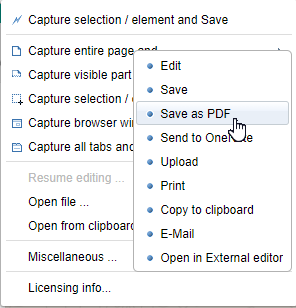
Thank you for your report. Can you please confirm whether you have the "Editor" option on your FireShot Pro trial? __________________ FireShot Pro Pro Full Webpage Screenshots will be moving to a subscription model soon!
Last chance to purchase a Lifetime License and get a 33% discount! - https://getfireshot.com/buy.php |
||
| Posted: 29 Jan 2026 23:24 | ||
|
|
Registered User Currently Offline |
Posts: 2 Join Date: Jan 2026 |
| Sorry, I'm not familiar enough with your software -- if you can give me the steps to confirm I have the Editor option, I'll be glad to follow them and let you know. | ||
| Posted: 01 Feb 2026 02:07 | ||
|
|
Administrator Currently Offline |
Posts: 4659 Join Date: Jan 2007 |
The Pro trial menu usually has the options shown on the screenshot:
 __________________ FireShot Pro Pro Full Webpage Screenshots will be moving to a subscription model soon!
Last chance to purchase a Lifetime License and get a 33% discount! - https://getfireshot.com/buy.php |
||
Pages: 1