“Fantastic tool, easy and solid. I can finally have an archive.”
Easy-to-use
FireShot Pro’s intuitive UI makes your work faster, easier, and more comfortable.
Powerful Editor
FireShot Pro has a built-in image editor for quick edits right after capture or anytime later.
Privacy by design
100% local captures keep your work private and offline‑safe.
“The best tool I've yet seen for making full web page screen capture and annotating...”
How you can use FireShot Pro:
- Converting web pages to PDF
- Creating how-to screenshots
- Documenting bugs
- Automating website screenshoting
- Communicating with support
- Preparing training brochures
- Assisting people with visuals
- Making still images from video
- Taking copies of bills, internet orders,
instructions and forms
Convert website page to screenshot
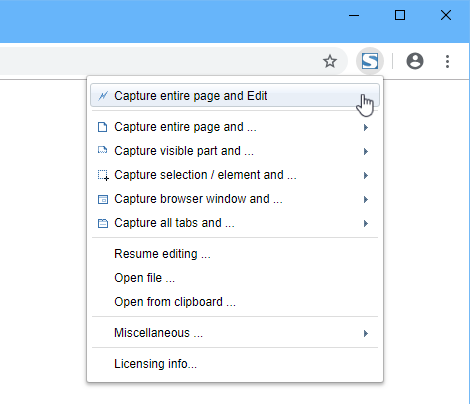
FireShot Pro extension integrates with your browser.
By doing this, FireShot makes full page screenshots providing a high quality output. It's possible to capture a selection or just a visible part of the web page.
You can also capture all open tabs or setup a batch mode.
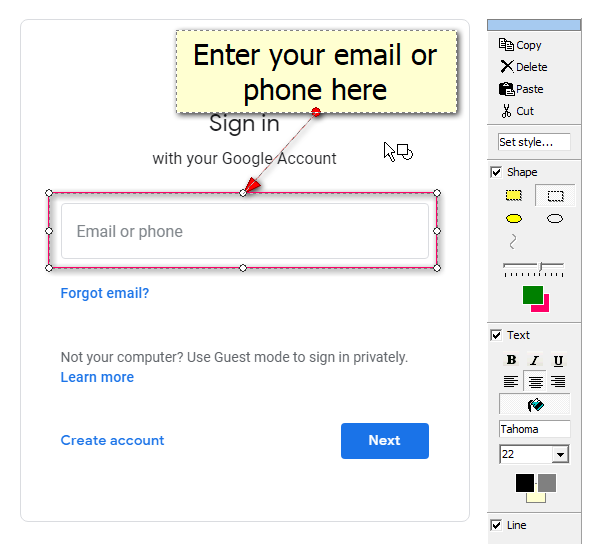
Edit and annotate screenshots
There's no need to run an external editor to quickly resize, crop, highlight, blur, or erase desired elements.
It's also extremely easy to add some quick text annotations!
Store results
A picture is worth a thousand words.
With FireShot you can save captures to disk as PDF (with direct links and searchable text), PNG, GIF, JPEG or BMP.
You can send results by email, upload, copy to clipboard, export to OneNote or another program directly from FireShot.

Full of useful features, but simple
Screen Capture
Create screenshots of full web page, visible part or just a selection. Capture all open tabs or provide a list of websites for capturing.
Edit
Simple and intuitive user interface makes your work with FireShot Pro more comfortable, easier and faster.
Annotate
Focus attention in your screenshots with the help of arrows, shapes and text annotations.
Customize
Append Headers, Footers and Watermarks to the screenshots to include information such as date, time, page URL, etc.
Save or Print
Turn live pages to useful information pieces by printing or saving to PDF, PNG, JPEG, BMP or GIF. Include live links into PDF documents.
Export
Organize your storage in Microsoft OneNote or setup export to another program.
Upload
Share screenshots via internet in seconds. FireShot also supports FTP and custom uploads.
Take full web page screenshots in your favorite browser:
Over 5 million happy users!

“Funciona excelente, funciones muy útiles para diferentes casos.”
56 mins ago

“Very useful”
1 hour ago

“標準のスクショよりこちらが便利だね。ちゃんと細かいところにも便利が行き届いてる”
1 hour ago

“Very useful, it's great.”
3 hours ago

“The only one I've kept using. Such a no-brainer.”
6 hours ago

“Simple does what I need it to quickly, reliably and with ease.”
6 hours ago

“I've found using this app much easier and straightforward than other similar ones”
21 hours ago

“無料でここまでできるのはとてもありがたいです。”
1 day ago

“一直都在,哪怕不用的时候,10来年了,感谢!”
1 day ago

“いつもとても助かっています。本当にありがたいです。”
1 day ago

“It just gets the job done and perfectly too”
1 day ago

“Cette application est absolument géniale. Bravo aux développeurs !”
2 days ago

“Funciona perfecto y es super intuitiva”
2 days ago

“Perfeita! Parabéns!”
2 days ago

“簡單好使”
2 days ago

“OMG! FireShot has been a game changer. It saves full screen or entire webpages -- that you can copy and paste, save a PDF or print. It saves so much time. There's no easy way to do what it does.”
2 days ago

“I have been using FireShot for years now and it is so good at taking screenshots of your whole page. I highly recommend it.”
2 days ago

“Precise, fast and discreet. Perfect.”
3 days ago

“ajuda demais , muito bom !”
3 days ago

“tiene lo que busco,funciona”
3 days ago