Thank you for updating FireShot!
Your version has been successfully updated to the latest release. This update delivers some new additions and improvements:
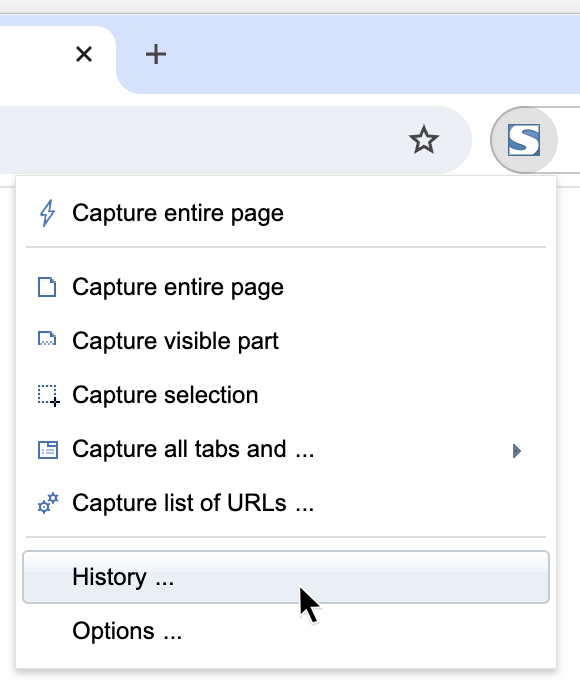
Meet History.
Stay Organized with FireShot's new Screenshot History feature.
With easy search functionality, finding and managing your screenshots is easy. Open, re-save, and organize your captures seamlessly — nothing is ever lost..
Additionally implemented/fixed:
- Advanced selection tools for capturing web page snippets.
- Added configurable time limit for taking a page capture.
- Fixed a problem with printing large screenhosts in FireShot Pro.
- Fixed error when screenshots could not be sent to an email client in FireShot Pro.
- Fixed an issue where pages containing hidden characters could not be saved.
- Changed screenshot sound.

Try advanced features provided by FireShot Pro!
For a limited time of the Beta preview program we provide it for free.
Gain instant access to the Pro features:
- Create multi-page PDF files (text-searchable and with direct links)
- Configure PDF page size, orientation
- Choose between single-page and multi-page PDF
- Optimized speed and performance
- E-Mail support
- Extended browser version compatibility (including betas)
- Free major and minor upgrades
- Advanced capturing features, selected page elements, inner frames
- Custom headers, footers, and watermarks
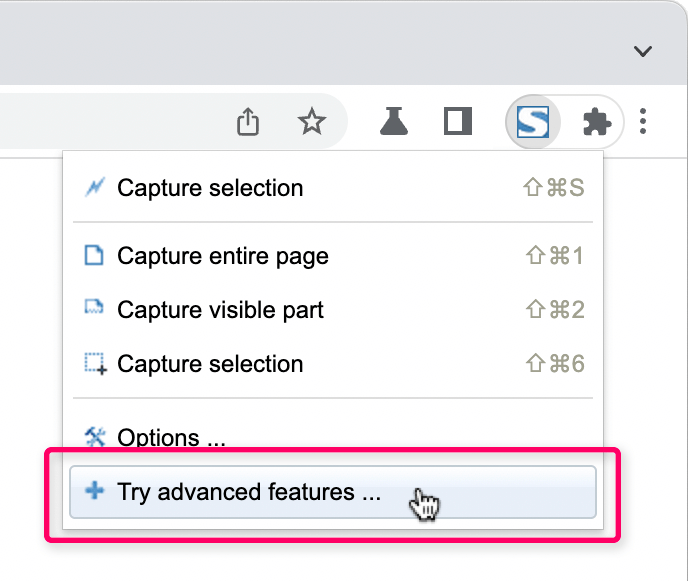
Only two clicks required to proceed:
- Display the FireShot's dropdown menu
- Select "Try advanced features"
- Voila!