Congratulations: FireShot Lite installed!
If you can see this page, then everything is ready for making breath-taking web page screenshots!
Ensure the FireShot button is visible in your toolbar by clicking the Extensions button and pinning the FireShot extension.
Click the button to capture a web page, or right-click the page and use the context menu to launch FireShot.
Is it FREE?
Yes! FireShot Lite is FREE forever. However, if you need more functionality, you can try the Pro version of FireShot.
Need performance and more functionality?

Become more productive using the advanced FireShot Pro features:
- Unlocked "Entire page" mode to capture all tabs or a list of URLs in a batch mode
- Create multi-page PDF files (text-searchable and with direct links)
- Advanced Editor: Undo/Redo, Resize, Crop and Save features
- Advanced capturing features
- Optimized speed and performance
- Printing and Uploading features
- Work with Projects
- Custom headers, footers, and watermarks
- E-Mail support
- Microsoft OneNote support
- Direct Drag&Drop support for Gmail, Dropbox, Google Drive, Sky Drive, iCloud, etc
Need performance and more functionality?
Become more productive using the advanced FireShot Pro features:
- Unlocked "Entire page" mode to capture all tabs or a list of URLs in a batch mode
- Create multi-page PDF files (text-searchable and with direct links)
- Configure PDF page size, orientation
- Choose between single-page and multi-page PDF (including smart splitting)
- Advanced capturing features, selected page elements, inner frames
- Optimized speed and performance
- Custom headers, footers, and watermarks
- E-Mail support
No credit card • Instant access • Cancel anytime
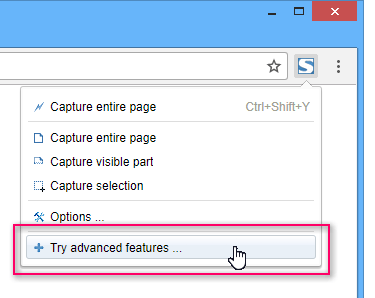
- Display the FireShot's dropdown menu
- Select "Try advanced features"
- Confirm installation
- You're done!
Frequently Asked Questions
Will FireShot Lite keep working after the trial?
Yes. The free version will always remain available.
Do I need to enter payment details?
No. The trial does not require a credit card.
Does FireShot Pro work in my browser?
Yes. FireShot is compatible with a wide range of browsers, including but not limited to Chrome, Edge, Internet Explorer, Firefox, Tor, Opera, Brave, Seamonkey, Pale Moon, Yandex, Vivaldi, and other browsers based on the Chromium platform or Mozilla products.
You can get the installation package here